How Do I Switch My Outfit?Updated 2 months ago
We no longer have the switch option. You can buy a collection or must have item, reschedule your payment, or skip the month.
In our new update, go ahead and log on to your Ellie account. You will see the VIP Credit bubble on the right side of your account. The credit code needed for check out will be visible in the bubble.
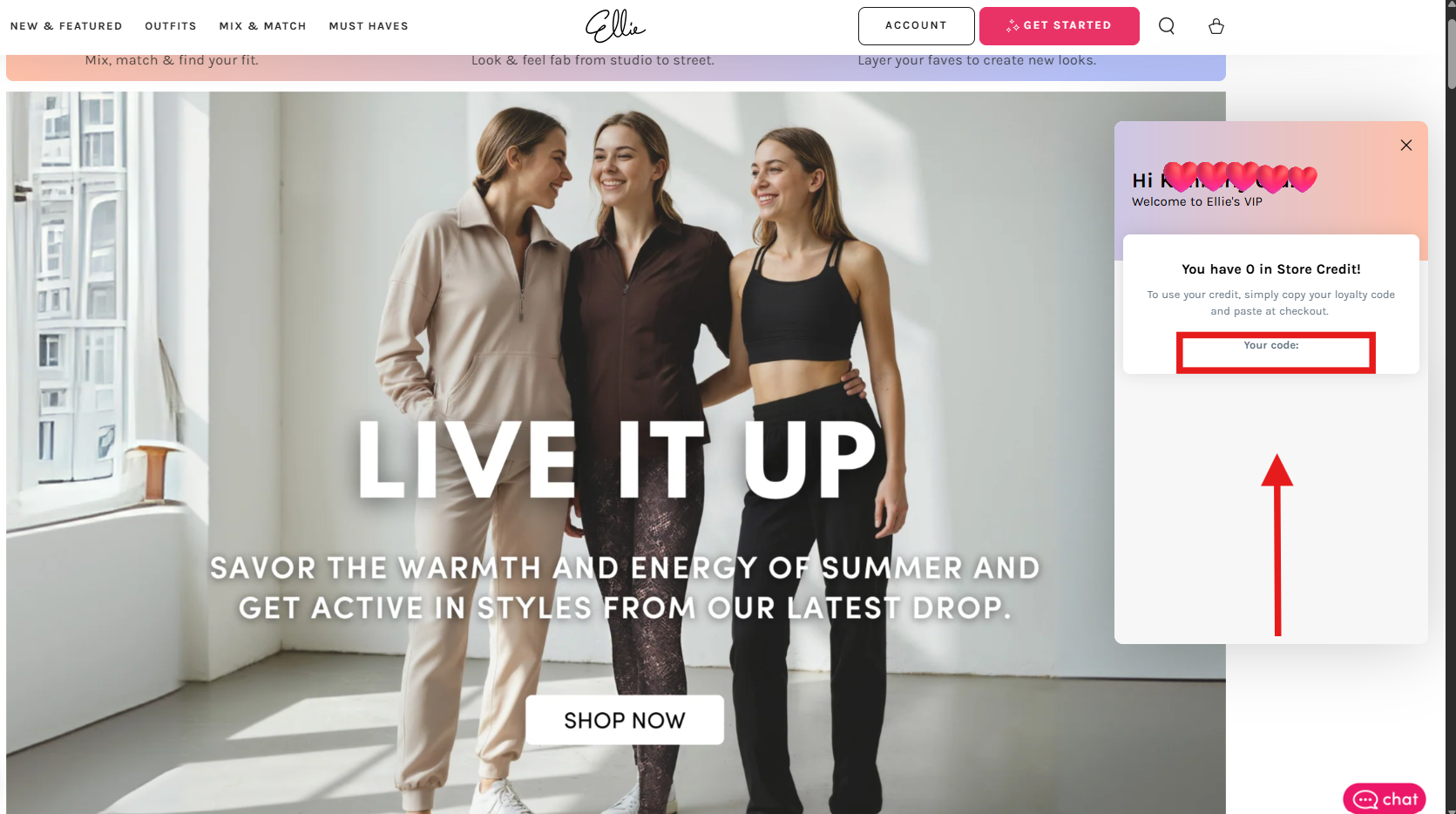
If you want the credit to be available in your account as early as the 1st-4th of the month, just head on to your account and click 'SEND NOW'.
This way, you will be immediately charged and you will receive the available credit in the VIP credit bubble.
If not, your account will be charged on the 5th and you can use the credit after you are charged.
You have the option to choose an outfit via Current Collections, Mix and Match, or choose from our Must Haves. If you don't see anything you like this month, you can save the credit for next month or choose to skip the month. Just make sure to check out your order and apply the credit code for your order.
Please be sure to be on the lookout for the confirmation email of your order.
If you do not get a confirmation email, it means your purchase did not go through
successfully and we ask that you contact customer service immediately.
You also have the option to Skip This Month from the 1st-4th if you do not
wish to receive a credit for this month and not be charged.
Please note that if no changes are made, you will be charged on the 5th and a credit will be accumulated in your account.
Feel free to reach out to us with any additional questions ♥